
Best Tablets Under £200 for Reading and Browsing (2026)
Best Tablets Under £200 for Reading and Browsing (2026)
What is the best tablet for reading and browsing under £200? If you can stretch just past £200, a discounted iPad is the answer — but strictly under £200, the fight is between Samsung’s Galaxy Tab A series, Lenovo’s Tab M11, and Amazon’s Fire HD 10. For reading and browsing specifically, the screen matters more than the processor, and that’s where the differences show.
I’ve spent enough time comparing budget tablets across the UK to know the headline figures rarely tell the full story. Prices shift between providers, the small print hides the real cost, and what works brilliantly for a mate in Manchester might be a poor fit for a flat in London. So let’s cut through the noise and look at what actually matters. If that’s on your mind too, have a look at our guide to how do I recycle old electronics in the uk — it pairs naturally with everything below.
What is the best tablet for reading and browsing under £200?
The Samsung Galaxy Tab A9+ (often £170-£200 on sale) is my top pick under £200: a sharp 11-inch screen, clean Samsung software with proper Google apps, and build quality that feels more expensive than it is. For reading the Kindle app, browsing, iPlayer and YouTube, it’s all the tablet most people need.
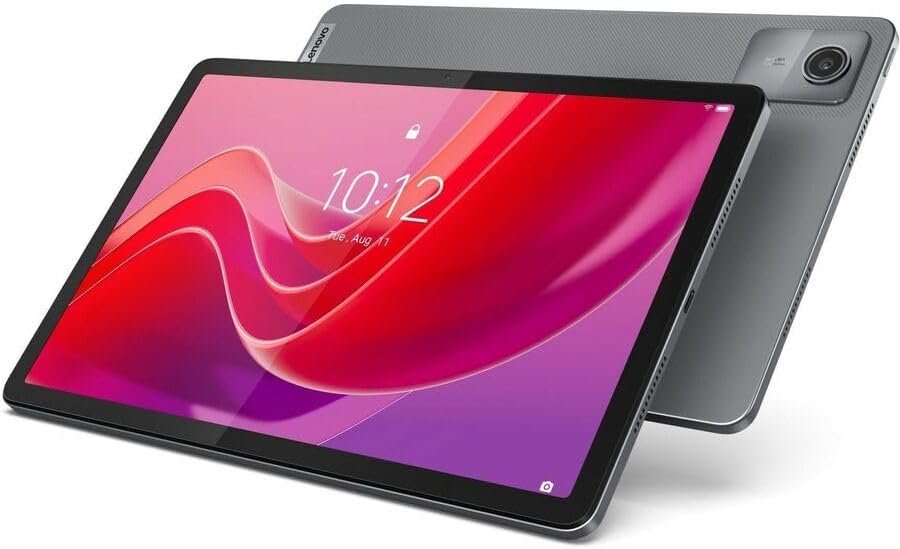
Lenovo’s Tab M11 (£130-£170) is the value champion — a decent 11-inch display, often bundled with a pen, and surprisingly good speakers. The software update policy is weaker than Samsung’s, but at this price that’s an acceptable trade. Amazon’s Fire HD 10 (£120-£150) is cheapest and fine for reading and Prime Video, but the locked-down Appstore (no proper Google apps without fiddling) frustrates many buyers within months.
Still with me? Good, because this next bit is where people usually go wrong. Worth a read alongside this: our guide to how much does it cost to replace a laptop battery in the uk.
What matters for reading and browsing
Here’s the short version, so you can scan it fast:
- Screen quality over speed: you’ll stare at this screen for hours — prioritise sharpness and brightness over processor benchmarks.
- Size: 10-11 inches is the sweet spot. Smaller is cramped for web pages; larger gets heavy for reading in bed.
- Battery: 10+ hours of reading per charge is standard; anything less is a miss at this price.
- Storage: 64GB minimum, 128GB better — apps and offline downloads eat space fast.
- Blue light / eye comfort: reading modes and warm display settings matter if you read before sleep.
If there’s one mistake I see repeated, it’s rushing this decision on a lunch break and regretting it for eighteen months. Take the extra ten minutes — this section repays it.
The case for stretching to an iPad
Here’s the thing nobody selling £150 tablets wants to say: the base iPad regularly drops to £300-£320 on sale, and it’s better than every sub-£200 tablet in ways that compound over years — longer software support (5-6 years vs 2-3), better apps, better resale value. If you’ll keep the tablet four years, the iPad costs less per year than a £180 tablet you replace after two.
But budgets are real, and £320 isn’t ‘under £200’. If £200 is a hard ceiling, buy the Samsung or Lenovo without regret — they’re genuinely good for reading and browsing. Just don’t buy a no-name £80 tablet; the screens are poor, they stop getting updates immediately, and you’ll replace it within a year.
E-reader vs tablet for reading
If reading is 90% of the use, consider a Kindle (£85-£150) instead — e-ink screens are dramatically easier on the eyes for long sessions, battery lasts weeks, and there’s no temptation to fall into a YouTube hole at midnight. Many serious readers own both: Kindle for books, cheap tablet for everything else.
The tablet wins when your reading is mixed — news apps, magazines, comics, PDFs with colour diagrams. E-ink handles none of those well. Match the device to your actual reading diet, not an idealised one.
Quick answers
What’s the biggest mistake people make with budget tablets?
Rushing in without comparing options. Most people grab the first budget tablets deal they see — usually an advert or a mate’s recommendation — and never check whether it actually fits their situation. Spend an hour comparing two or three alternatives, read the small print on the cheapest one, and you’ll dodge the regret that lands three months later when the bills arrive or the limitations start to bite.
Is the cheapest budget tablets option ever the right choice?
Sometimes — but rarely for the reasons people think. The cheapest budget tablets option works fine when your needs are simple and the product is basically a commodity. It falls apart when reliability, support or longevity matter. Ask yourself one question: what’s the cost if this goes wrong? If the answer is ‘a bad afternoon’, go cheap and cheerful. If it’s ‘hundreds of pounds or weeks of hassle’, pay the middle price and sleep well.
What should I do first if I’m completely new to budget tablets?
Start with the free, reversible steps: research, compare, and get your facts straight before spending a penny or signing anything. Make a shortlist of two or three options, check recent reviews — and read the one-star ones, not just the average — and talk to someone who’s done it before you. Ten minutes of asking around beats ten hours of guessing, and it costs nothing.
Pro tip: whatever you decide about budget tablets, set a calendar reminder to review it in a year’s time. Prices, products and your own needs all shift — the people who get the best value long-term are the ones who revisit decisions, not the ones who choose perfectly on day one.
What I’d actually do
Under £200, the Galaxy Tab A9+ on sale is the best all-rounder, Lenovo Tab M11 the value pick, Fire HD 10 only if you live in Amazon’s ecosystem. Prioritise screen quality, and if you can stretch to a sale-price iPad, it’s cheaper per year over its lifetime.
Nobody else is going to sort this for you, and honestly it doesn’t take long once you know what you’re looking at. Pick the option that fits, set a reminder to review it in a year, and get on with your life. Final thought: the market rewards people who shop around and punishes people who don’t. You’re now in the first group. For the official word, see Which? best cheap tablets. Amazon Fire tablets UK is also worth a look for independent comparisons. And if you’re still weighing things up, our guide to is it worth buying an extended warranty on electronics in the uk covers the next question most people ask.