
How to Free Up iPhone Storage Without Deleting Photos
How to Free Up iPhone Storage Without Deleting Photos
How do I free up storage on an iPhone without deleting photos? Good news: photos are rarely the real problem — it’s apps, cached data and ‘Other’ system storage quietly eating tens of gigabytes. The fixes below routinely free 10-30GB without touching a single picture.
I’ve spent enough time comparing iPhone storage across the UK to know the headline figures rarely tell the full story. Prices shift between providers, the small print hides the real cost, and what works brilliantly for a mate in Manchester might be a poor fit for a flat in London. So let’s cut through the noise and look at what actually matters. If that’s on your mind too, have a look at our guide to what is the best wireless earbuds option under £50 in the uk — it pairs naturally with everything below.
How do I free up storage on an iphone without deleting photos?
Do it in this sequence and you won’t miss anything important:
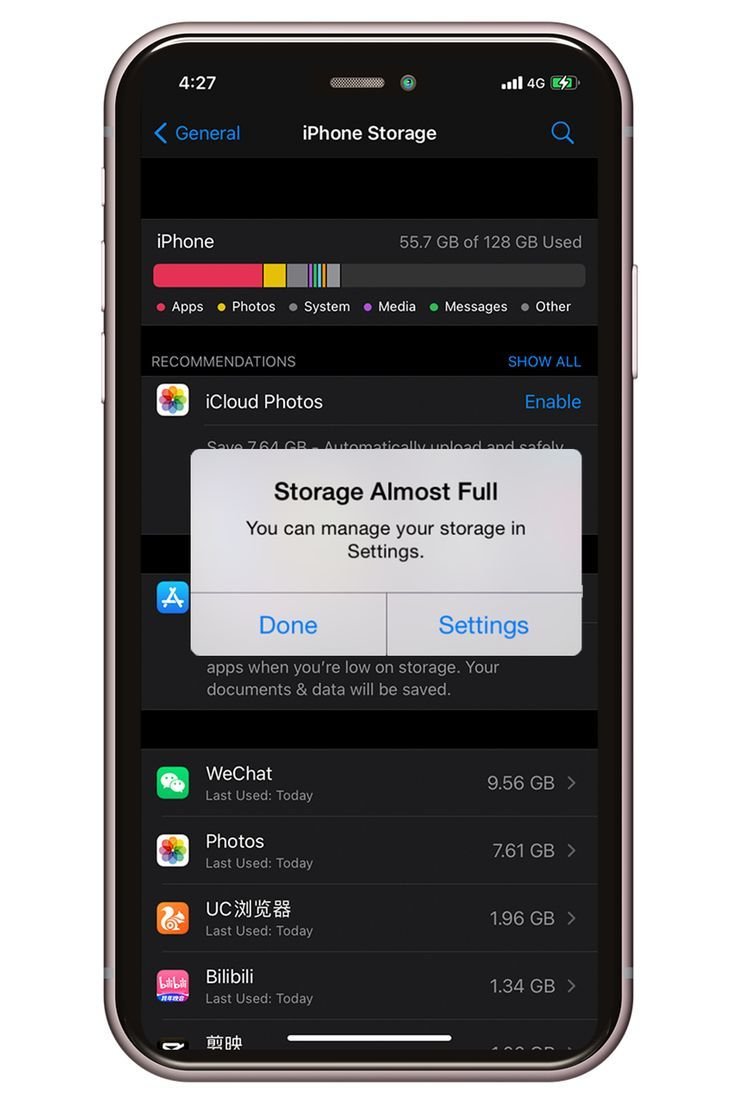
- Offload unused apps: Settings > General > iPhone Storage > enable ‘Offload Unused Apps’. This removes the app but keeps its data — gigabytes back, nothing lost.
- Clear Safari’s cache: Settings > Safari > Clear History and Website Data. Can free 1-3GB of ancient website data.
- Review the storage hogs: the iPhone Storage screen lists apps by size — attack the top five. Streaming apps with downloaded content are usual suspects.
- Delete downloaded media: remove offline Netflix/Spotify/Apple Music downloads you no longer need — re-downloadable anytime.
- Clear message attachments: Settings > General > iPhone Storage > Messages — years of videos in chats can total gigabytes. Keep the texts, ditch the attachments.
- Restart the phone: clears temporary caches; the mysterious ‘System Data’ category often shrinks noticeably.
Now for the part most guides skip: the practical trade-offs. Worth a read alongside this: our guide to is cloud storage worth paying for in the uk.
The ‘Other’ / System Data mystery
That grey ‘System Data’ bar that eats 10-20GB is mostly caches, logs and temporary files iOS is supposed to manage itself — emphasis on ‘supposed to’. When it balloons, the reliable fix is boring but effective: back up to a computer, then restore. It clears the cruft iOS won’t release any other way.
Before that nuclear option, try the app-level clears: WhatsApp’s storage management (Settings > Storage and Data > Manage Storage) alone can free gigabytes of forwarded videos. Telegram, TikTok and Instagram all have in-app cache clears too — check each one’s settings.
If there’s one mistake I see repeated, it’s rushing this decision on a lunch break and regretting it for eighteen months. Take the extra ten minutes — this section repays it.
Optimise photos instead of deleting them
You said no deleting photos — but you can shrink their footprint: enable Settings > Photos > ‘Optimise iPhone Storage’ and full-resolution originals live in iCloud while lightweight versions stay on the phone. This alone can halve the Photos app’s size.
Yes, this nudges you toward paid iCloud — but the 50GB tier is 99p a month, less than a coffee. Alternatively, back photos up to Google Photos (15GB free) and use ‘Free up space’ there. Either way, the photos survive; only the local copies slim down.
Stop it filling up again
Boiled down to what matters:
- Stream, don’t download: unless you’re regularly offline, streaming saves gigabytes.
- Cap WhatsApp auto-downloads: stop every group chat video saving automatically.
- Review storage quarterly: five minutes every few months beats a crisis clear-out.
- Buy more storage next time: 128GB is the realistic minimum in 2026; the £50 step-up at purchase beats years of juggling.
Quick answers
What’s the biggest mistake people make with iPhone storage?
Rushing in without comparing options. Most people grab the first iPhone storage deal they see — usually an advert or a mate’s recommendation — and never check whether it actually fits their situation. Spend an hour comparing two or three alternatives, read the small print on the cheapest one, and you’ll dodge the regret that lands three months later when the bills arrive or the limitations start to bite.
How long does sorting out iPhone storage usually take?
Less time than you’re probably imagining. The research takes an evening, the decision takes a day of mulling over, and the actual doing is usually under two hours. What stretches it into weeks is dithering — half-decided, tab-hoarding limbo. Pick a deadline, gather the facts from this guide, make the call, and move on. Done beats perfect here, every single time.
How much should I realistically budget for iPhone storage?
More than the headline price, less than the premium option. A sensible budget for iPhone storage sits in the middle of the market — enough to avoid the cut corners of the cheapest tier, without paying for features you’ll never touch. Add 15-20% contingency for the extras nobody mentions upfront, and you’ll land about right. The people who blow the budget are the ones who budgeted for the advert price instead of the real one.
Pro tip: whatever you decide about iPhone storage, set a calendar reminder to review it in a year’s time. Prices, products and your own needs all shift — the people who get the best value long-term are the ones who revisit decisions, not the ones who choose perfectly on day one.
The bottom line
Offload unused apps, clear caches and message attachments, optimise photo storage — 10-30GB back without losing a photo. And next time, buy the bigger storage tier; it’s the cheapest peace of mind in tech.
Nobody else is going to sort this for you, and honestly it doesn’t take long once you know what you’re looking at. Pick the option that fits, set a reminder to review it in a year, and get on with your life. Final thought: the market rewards people who shop around and punishes people who don’t. You’re now in the first group. For the official word, see Apple: manage iPhone storage. Apple: optimise photo storage is also worth a look for independent comparisons. And if you’re still weighing things up, our guide to how much does it cost to print at home versus using a print shop covers the next question most people ask.
One thought on “How to Free Up iPhone Storage Without Deleting Photos”