
Fibre vs Full Fibre Broadband: What’s the Difference?
Fibre vs Full Fibre Broadband: What’s the Difference?
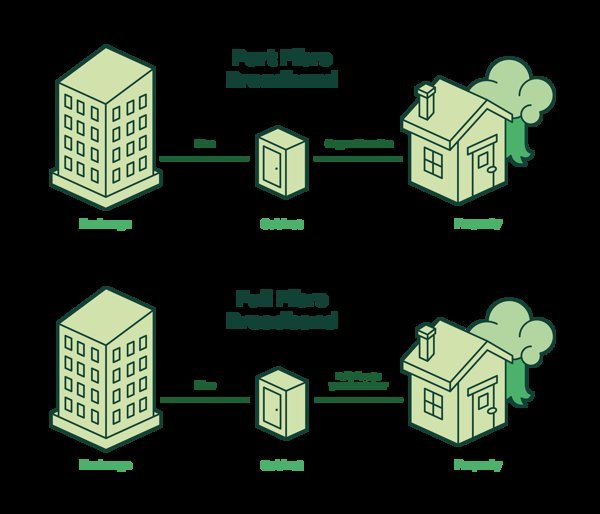
What is the difference between fibre and full fibre broadband? It’s all about the last stretch of cable to your home: ‘fibre’ (FTTC) runs fibre to the street cabinet but old copper wire to your door, while ‘full fibre’ (FTTP) runs fibre all the way. That final copper stretch is why one does 70Mbps and the other does 900Mbps.
Before we get into the detail, a quick reality check: the “best” answer depends on your circumstances more than any ranking ever will. A student in shared housing needs something very different from a family of five or a freelancer working from a spare room. Keep your own situation in mind as you read, and you’ll land on the right choice. If that’s on your mind too, have a look at our guide to how do I stop spam calls on my mobile in the uk — it pairs naturally with everything below.
What is the difference between fibre and full fibre broadband?
Standard ‘fibre’ broadband (FTTC — fibre to the cabinet) uses fibre optic cable to your street’s green cabinet, then the existing copper phone line for the final few hundred metres. Copper degrades with distance, so speeds range from 30-70Mbps depending on how far you live from the cabinet. It’s the broadband most of the UK has had for a decade.
Full fibre (FTTP — fibre to the premises) replaces the copper entirely with fibre optic cable direct to your home. Speeds of 100Mbps to 1Gbps+, symmetrical uploads, and rock-solid reliability regardless of distance. It’s simply better in every technical respect — the only question is whether you can get it and whether you need it.
Right — with the basics covered, let’s get into the detail that actually affects your wallet. Worth a read alongside this: our guide to how long should a laptop last before replacing it.
Head-to-head comparison
If you only read one list today, make it this one:
- Download speed: fibre 30-70Mbps vs full fibre 100-1000Mbps.
- Upload speed: fibre 5-20Mbps vs full fibre 100-1000Mbps (symmetrical on many providers).
- Reliability: full fibre barely notices bad weather; copper connections degrade in rain and with age.
- Latency: full fibre is lower — noticeable for gaming and video calls.
- Price: full fibre costs £5-£15/month more than equivalent fibre — though the gap is shrinking.
- Availability: fibre covers ~97% of the UK; full fibre is around 80% and climbing fast.
If there’s one mistake I see repeated, it’s rushing this decision on a lunch break and regretting it for eighteen months. Take the extra ten minutes — this section repays it.
Do you actually need full fibre?
Honest answer: most households don’t — yet. A 70Mbps FTTC line handles 4K streaming on two TVs, video calls and general browsing simultaneously without breaking a sweat. If your current fibre works fine, upgrading to full fibre buys you headroom you’ll rarely touch.
You DO benefit if: you regularly upload large files (creators, remote workers with cloud backups), your household has 6+ heavy users, you want the lowest gaming latency, or your copper line is unreliable. Future-proofing is also legitimate — full fibre is the endgame infrastructure, and getting it now means never thinking about broadband again for a decade.
How to get full fibre
Walk through these in order and you’ll be sorted:
- Check availability: Openreach, Virgin Media and alt-nets (Hyperoptic, Community Fibre) each have postcode checkers.
- Compare providers serving your address — don’t assume the big names are cheapest.
- Note installation: full fibre needs an engineer visit to run cable to your home (free with most installs).
- Ask about the ONT box placement — the fibre terminates in a small box on your wall; agree the location with the engineer.
- Keep your old service until the new one works — overlap beats downtime.
Quick answers
Can I handle fibre broadband types myself, or do I need professional help?
It depends on complexity and stakes. Straightforward fibre broadband types tasks are well within DIY territory with a decent guide — most people manage fine and save a packet. But when money, legal compliance or safety are involved, professional help pays for itself quickly. My rule of thumb: DIY when the worst case is a wasted afternoon; call in a pro when the worst case is wasted money or a legal headache.
Is the cheapest fibre broadband types option ever the right choice?
Sometimes — but rarely for the reasons people think. The cheapest fibre broadband types option works fine when your needs are simple and the product is basically a commodity. It falls apart when reliability, support or longevity matter. Ask yourself one question: what’s the cost if this goes wrong? If the answer is ‘a bad afternoon’, go cheap and cheerful. If it’s ‘hundreds of pounds or weeks of hassle’, pay the middle price and sleep well.
How long does sorting out fibre broadband types usually take?
Less time than you’re probably imagining. The research takes an evening, the decision takes a day of mulling over, and the actual doing is usually under two hours. What stretches it into weeks is dithering — half-decided, tab-hoarding limbo. Pick a deadline, gather the facts from this guide, make the call, and move on. Done beats perfect here, every single time.
Pro tip: for fibre broadband types, the middle of the market is usually the sweet spot. The cheapest tier cuts the corners you’ll notice every single day; the premium tier charges for bragging rights. Buy the best of the mid-range and you’ll rarely regret it.
My honest take
Fibre = fast-ish over old copper (up to 70Mbps). Full fibre = blazing over glass all the way (100Mbps-1Gbps). Upgrade if you upload heavily, game competitively or your copper line misbehaves — otherwise, your current fibre is probably fine.
At the end of the day, the right choice is the one that fits your life and your budget — not the one with the flashiest advert. You’ve now got the facts; trust your judgement. Final thought: the market rewards people who shop around and punishes people who don’t. You’re now in the first group. For the official word, see Openreach: full fibre checker. Ofcom broadband advice is also worth a look for independent comparisons. And if you’re still weighing things up, our guide to can I use a us-bought phone on a uk network covers the next question most people ask.