
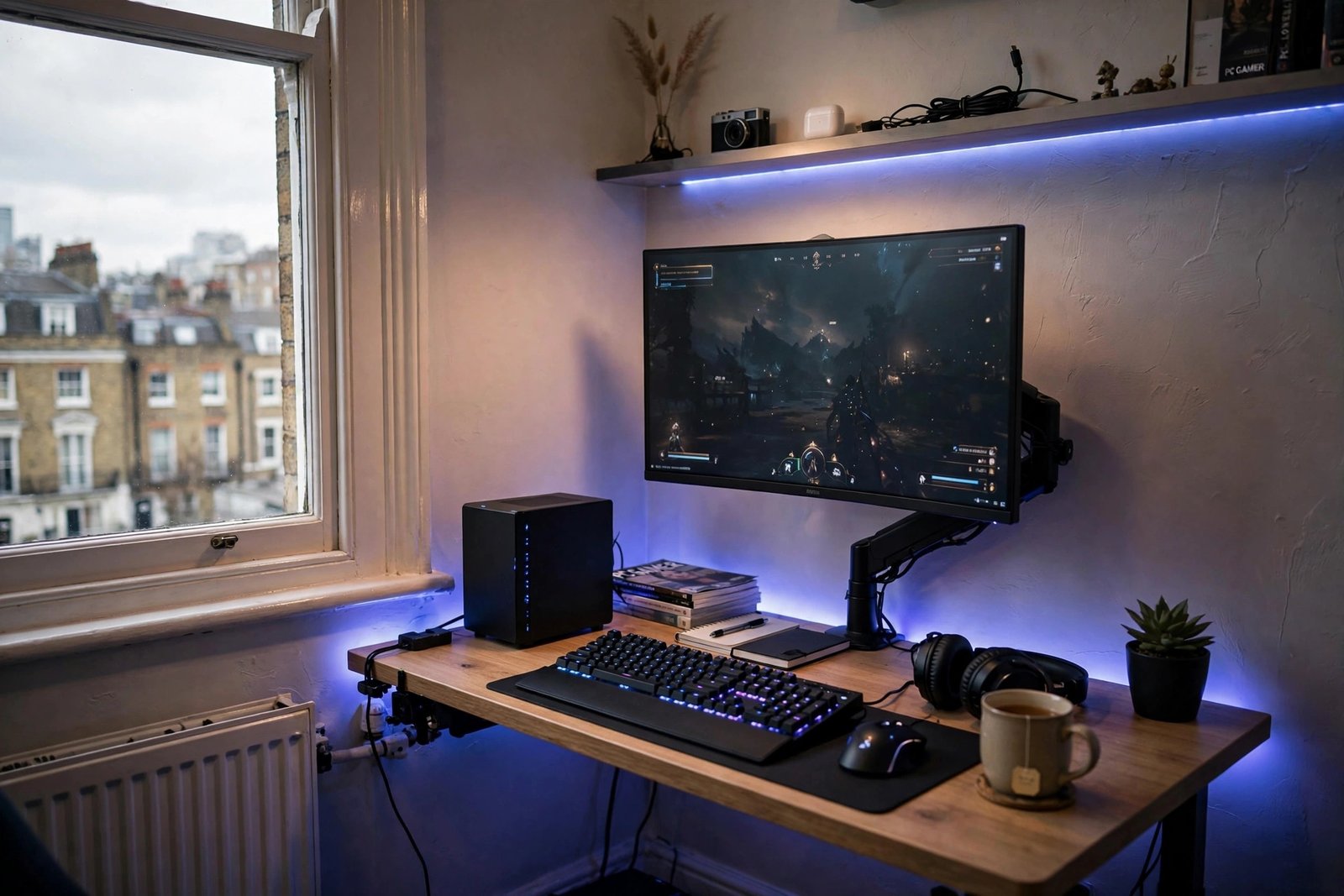
How to Fit a Gaming Setup in a London Flat
A full gaming setup in a London flat sounds like a contradiction: high-end PCs, triple monitors and racing rigs belong in suburban spare rooms, not in 45 square metres shared with a partner, a cat and a landlord’s magnolia walls. Yet thousands of London gamers run superb setups in tiny spaces — because fitting a gaming station into a small flat is a design problem, and design problems have solutions.
This guide covers the space-saving principles, the furniture that actually works, noise and heat management in small rooms, and how to keep the setup flat-friendly for deposits, neighbours and relationships.
Start with honest measurements
Before buying anything, measure your available space and your doorways. The classic mistake is ordering a 160cm desk for an alcove that is 140cm wide. In London flats, the viable spots are usually: a bedroom corner, an alcove or chimney-breast recess, the end of a living room, or a cupboard-turned-office. A comfortable single-monitor setup needs roughly 100–120cm of desk width and 60cm of depth; dual monitors want 140cm+.
Think vertically. Wall space is free in a way floor space is not: monitor arms clamp to the desk edge and lift screens off the surface, wall-mounted shelves hold consoles and controllers, and pegboards organise headsets and cables. Every item that moves from desk to wall is desk space reclaimed. If the whole flat is tight, organising a small London flat with no storage has principles that apply directly to gaming gear.
Choose compact-first hardware
Hardware choice is where small-space setups are won. A small-form-factor (SFF) PC or a powerful gaming laptop takes a fraction of the space of a full tower — modern ITX builds game at 1440p without breaking a sweat. Single ultrawide monitors replace dual-screen arrays with one panel and one stand. Wireless peripherals eliminate cable sprawl: a wireless keyboard, mouse and headset remove the three messiest cables instantly.
Consoles are naturally flat-friendly — a PS5 or Xbox tucks onto a shelf and pairs with the TV you already own. If you are deciding between platforms, whether buying a PS5 in 2026 is worth it breaks down the current value. Cloud gaming is the ultimate space saver — no box at all — though it demands solid broadband.
The desk: the most important purchase
In a small flat, the desk must earn its footprint twice. Look for: 100–120cm width with real depth (60cm minimum for monitor distance), cable management trays or grommets, and ideally a fold-down or wall-mounted design if the room doubles as something else. Wall-mounted drop-leaf desks are brilliant for multipurpose rooms — gaming station by night, clear wall by day.
Second-hand is your friend: London’s Facebook Marketplace and Gumtree overflow with solid desks from people leaving the city. A £40 used IKEA desk with a £25 monitor arm beats a £200 “gaming desk” with LED strips you will turn off after a week. Chair-wise, prioritise ergonomics over racing aesthetics — your back does not care about branding.
Noise, heat and neighbours
A gaming PC in a small bedroom is a space heater with opinions. Manage heat with sensible airflow (intake at front/bottom, exhaust at rear/top), undervolting if you are comfortable with it, and keeping the tower off carpet. In summer, a flat can become genuinely uncomfortable — game with the window open and consider the room’s ventilation before buying a 400W GPU.
Noise matters more in flats than houses. Mechanical keyboards with clicky switches, shouting into voice chat at 1am, and subwoofers are all neighbour-relationship destroyers. Solutions: linear or silent switches, a good closed-back headset (which also improves immersion), and a “quiet hours” agreement with yourself. Your neighbours will never complain about a setup they cannot hear.
Power bills and the London reality
Gaming hardware drinks electricity, and London electricity is not cheap. A mid-range gaming PC draws 300–500W under load — three hours of daily gaming can add £15–£25 a month to your bill. Check how much electricity a gaming PC uses per hour for the detailed maths, and consider the Energy Saving Trust’s guidance on efficient electronics. Enable aggressive sleep settings, switch off at the wall (standby drain is real), and remember that a laptop or console sips power compared with a desktop.
Cable management: the small-space multiplier
In a large room, messy cables are ugly. In a small flat, they are a quality-of-life issue — snagging on chairs, collecting dust in corners you cannot reach, and making the whole setup feel chaotic. Spend one focused hour on cable management and the setup transforms. Route power through a single surge-protected extension mounted under the desk, bundle cables with reusable velcro ties (never single-use zip ties you will cut in frustration), and use adhesive cable channels to run everything along the desk’s rear edge.
Label both ends of every cable with small tags — future-you will be grateful during the first troubleshooting session. Keep a small box for spare cables and adapters rather than a drawer of tangled mystery leads. And go wireless where the latency does not matter: keyboard, mouse and headset first, controller second. Every cable eliminated is one less thing competing for space in a room where space is the scarcest resource.
Keep it landlord and partner friendly
Most London renters cannot drill freely, so favour clamp mounts, adhesive cable channels and freestanding shelves over wall anchors. Keep the setup visually tidy — cable management is not vanity in a small flat, it is the difference between “cool corner” and “eyesore” when the living room is also the gaming room. A room divider or curtain can hide the battlestation when guests come over.
If you share the flat, negotiate the social contract early: headphones after 10pm, no voice chat in the bedroom while someone sleeps, and a setup that can be tidied in five minutes. The best small-space setup is one your flatmates barely notice — until you invite them to play. Which? reviews monitors, desks and accessories with the kind of rigorous testing that cuts through marketing hype.
Conclusion
Fitting a gaming setup in a London flat is entirely doable: measure honestly, think vertical, choose compact hardware, tame noise and heat, and respect the shared space. The result is not a compromised setup — it is a smarter one, where every centimetre earns its place. Some of the best battlestations in the city live in the smallest rooms; yours can too.
Frequently Asked Questions
How much space do I need for a gaming setup?
A comfortable single-monitor setup needs about 100–120cm of desk width and 60cm depth. With a monitor arm and wall storage, even a bedroom corner works.
Is a gaming laptop better than a PC for a small flat?
For space, yes — a laptop plus monitor dock gives desktop-class gaming that packs away in seconds. Desktops offer more power per pound and upgradability if you have a permanent spot.
How do I keep a gaming PC cool in a small room?
Ensure proper case airflow, keep the tower off carpet and away from walls, undervolt if confident, ventilate the room, and avoid the highest-wattage GPUs unless the room can handle the heat.
Will my landlord mind a gaming setup?
A freestanding desk setup is just furniture — no issue. Avoid drilling for mounts without permission; use clamp-based monitor arms and adhesive cable management instead.
How much does a gaming setup add to electricity bills?
A mid-range PC gaming three hours daily typically adds £15–£25 a month at 2026 London prices. Consoles and laptops cost noticeably less to run.